Most property management business owners don't actually own a business. They own a job. Every decision, every exception, and every problem lands on their plate.
I lived that for years. Now I run a company with more than 700 doors and take the whole month of June off. No email, no calls, and when I come back the business is running better than ever. It's worked that way for 4 years straight, and it isn't because I got lucky with great hires. I'm an engineer by training, so I built a machine to run the business instead of trying to run it myself. The machine is a set of documented processes, each with one owner, living in workflow software that eventually starts them automatically.
This course walks through how to build that machine, one process at a time. It's for PM owners who are still the one putting out every fire.
What you'll learn
- Pick the four core processes that every property management company runs every month
- Turn one process into a working checklist by sitting down with the person who does it
- Choose workflow software that can run a separate copy of each process for every property, tenant, or owner
- Write checklists for the common case and add instructions until someone with no training can run them
- Give every process one owner, then take your own name off the steps
- Set up triggers so processes start on their own instead of relying on someone's memory
New courses land on YouTube first. Subscribe
Why everything still runs through you
Key takeaway
Most PM owners own a job. The way out is to rebuild the company around a small set of documented processes your team runs without you.
If you're the one running around putting out fires, you know the feeling. You hire great people, train everybody, tell them what to do, and still every decision, every exception, and every problem lands on your plate. The toughest customer, the vendor who didn't show up, the tenant who says the neighbor's cat attacked their daughter. It all comes to you. You got into this to own a business, and instead it feels like babysitting.
After a couple of years in the business, I started asking how I could take an engineering approach to property management and turn it into a system, a machine that would free me up.
The course follows this path:
- Pick one core process
- Write the checklist
- Move into workflow software
- Get your team using it
- Take your name off
- Automate the triggers
Once you can take a month off, good things start happening. You get a better quality of life. Your business runs better even when you're there, and it keeps growing, hiring, firing, fixing systems, and dealing with problems without you involved in every step.
Start with the core four
Key takeaway
Don't boil the ocean. Start with the four processes every PM company runs every month, and systematize one of them first.
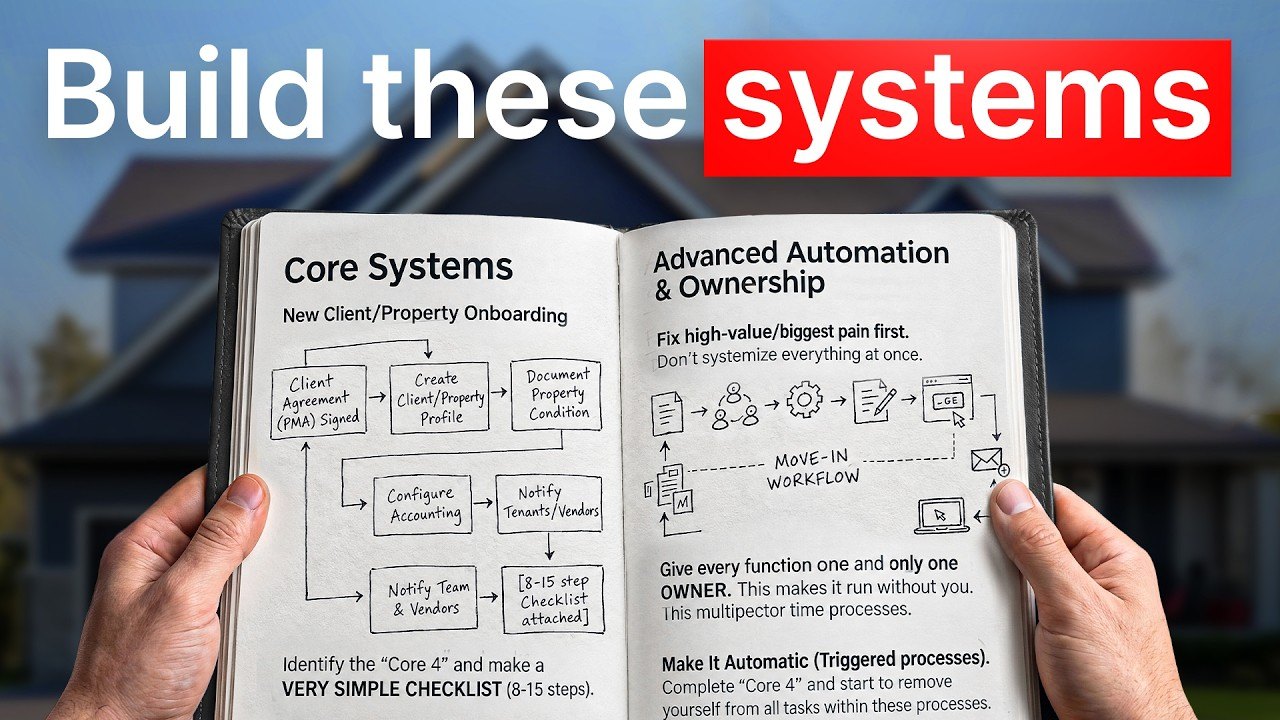
Every property management company has five or six absolute core processes it executes over and over. I like to start with what I call the core four:
- New property/owner onboarding
- Move-in (your new tenant process)
- Lease renewal
- Move-out
Every property management company in the United States runs these every single month, whether they know it or not.
At most companies, these processes are undocumented, poorly defined, inconsistently executed, or all of the above. That's how it was at my business when I started. It leads to errors, it burns up your team's time (and yours), and it keeps you chained to the business in firefighting mode.
Don't try to tackle all four at once. Pick one. It becomes the building block for everything else in this course.
Write the checklist with the person who does it
Key takeaway
Sit down with whoever runs the process, write every step as a plain checklist, then run a fresh copy of it for every lease, tenant, or owner.
Write it down
- Get with the person who actually does the process. If that's you, great. If it's someone on your team, sit down next to them.
- Grab a piece of paper. It doesn't have to be fancy software. It's better if it isn't, to start.
- Walk through it step by step. Ask, "When someone signs a lease, what's the first thing you need to do in the move-in process?" Write it down. "What's the next thing?" For example: accept the security deposit and record it in the system. Write that down too. Keep going to the end.
- Keep it to a checklist. Short steps, not detailed instructions.
- Review it with the same person. Expect a little reordering and rewording. Get it to where you both like it.
Keep it simple, then make it digital
Once the checklist is where you want it, move it somewhere digital. That can be as simple as a Google Doc with checklists or some basic workflow software. Then get your team using it.
At this stage, don't use fancy workflow software, don't try to automate anything, and don't write detailed step-by-step instructions yet.
Run a new copy every time
This is the key to the whole thing: every time you sign a new lease or a tenant moves out, you start a new copy of the checklist, labeled with the specific tenant, lease, property, or owner.
After a few weeks, you should have one copy for each lease or client it applies to. If you're doing the move-in process and you signed eight leases last month, you should have eight copies of that checklist. Some will be fully completed, some partially completed, and some not started yet. That's totally normal. You can open each one and see what's going on.
If you can get to that point, you're ready for the next step.
Move the checklist into workflow software
Key takeaway
Real workflow software gives you a live status for every process, a record of who did what, one template to update, instructions on every step, and the ability to hand steps to other people.
What the software has to do
You can use the built-in workflow tool in your property management software or a dedicated one. Whatever you choose, make sure it can:
- Hold process templates for different types of processes
- Start a new instance of a process for every new tenant, owner, or whatever the process covers
- Let multiple people view the checklist and check off different parts of it
- Show an overview of the status of every instance
For example, on the move-in overview you should be able to see that 123 Main Street is halfway done, 456 Main Street hasn't started, and 789 Main Street is fully completed.
What it does for you
- You see the status of every process. Done, not started, or partially completed, for every property. Being able to see where everything is in your business is huge.
- You get a written record of completion for every step. If someone says "you never did this," or a team member says "no, I did that," you can see exactly who checked off which step, in which process, on what date and time. No more finger-pointing.
- You update the process once. Written processes go out of date because the business keeps changing. With a template, you fix the typo, reorder the steps, or add a new step in one place, and every future move-in or move-out uses the new version. Anyone who runs the process from then on is on the latest version.
- You can add instructions to each step. Instructions sitting right on the step mean everyone does it the same way every time. They also make it quick to hand parts of the process to other people. Say you've been doing every step of the move-out process yourself because you want the security deposit handled correctly. Once it's in workflow software, you can reassign "upload the move-out inspection to Dropbox" to Jeff. From then on, every move-out automatically assigns that step to Jeff, and you can keep the important steps assigned to yourself.
- Your processes run correctly and consistently. Getting just the core four documented and into workflow software frees up your brain and your time for more important work.
Note
This video is sponsored by LeadSimple, the process automation software we use at my company for onboarding, maintenance, lease renewals, and move-outs. The steps in this course work in whatever workflow software you choose.
If you want to see what this looks like for real, here's me building a full lease renewal process in LeadSimple from scratch. Follow along and build yours at the same time.
 Watch on YouTube
Build for the common case
Key takeaway
Write each checklist for the way the process usually goes, and let people raise their hand on the exceptions. A process is done when someone with no training can run it without you.
Roll it out slowly
Once people see what's possible, they want to do everything at once. I'm guilty here too. Instead, roll it out in a slow, methodical way: start with the core four, get comfortable with the software, get your team onboarded, and go from there.
Skip the edge cases
The most common mistake I see is trying to cover every possible scenario, every edge case, and every exception with fancy conditional logic. That's too much, and your team is going to hate you.
Exceptions are where someone with a brain raises their hand and says, "Let me go ask somebody about this," instead of blindly following the checklist. The more exceptions you encode, the less powerful the checklist gets. Ironically, it turns clunky, causes mistakes, and goes out of date, because nobody wants to fix something that complicated.
The done test
Could somebody with no training sit down at a computer and run the whole process without you? If so, congratulations, that process is done. And yes, it's possible to get there.
If someone has to raise their hand and ask you, or says "Where's this document? I didn't see a link," go back to the process and add more instructions to that step.
Put the how-to where the work happens
The instructions for a process should live where the checklist lives. Don't keep a separate Notion page explaining the move-in process. Your move-in process lives in LeadSimple or whatever software you use, and the instructions for it should be built into that same software, right where people do the work.
Where this goes wrong
- Doing everything at once. Start with the core four and expand from there.
- Building for every exception. Conditional logic for every edge case makes the checklist clunky, error-prone, and outdated.
- Instructions in a separate place. Put how to do it where you do it.
Give every process one owner
Key takeaway
Different people can do different steps, but exactly one person owns each process and makes sure all of it gets done right and on time.
Your move-in process needs an owner. Your move-out process needs an owner. Maybe that's you for now, and that's okay. As your business grows, you should delegate these processes to other people.
Plenty of people can do steps. Cindy might handle a couple, Jeffrey four others, and you a couple more as the business owner. That's fine. There's still one owner of the process, and that person is accountable for all of it getting done right and on time. They follow up with Jeffrey and Susie: "Your stuff's not done yet. What's going on? Do you have a problem or a question? Let's get it done."
There's an old saying: the fastest way to starve a dog is to make two people responsible for feeding it. If two people own a process, you're back to the starving dog.
Get your team using it
Key takeaway
Make sure your team is really using the new system, let them edit it, then build out the rest of your processes.
Once you've built the core four, it's time to take things to the next level.
- Check that everyone is really using it. Go to everyone involved and ask: Are you using the new process software? How do you like it? What are the problems? Where are the errors?
- Let your team edit the checklists. Give them edit access in the software and tell them, "If you see a typo, a broken link, a missing description, or a step that needs adding or reordering, go make the change and let me know so I can take a look." You want them to feel like they own it. You'll be amazed how they latch on. Come back in a few months and they'll have built these processes out to the nines.
- Finish out the rest of your processes. Beyond the core four, most PM companies run a few other core processes: collections or evictions, de-management (offboarding an owner), even a new employee checklist. Build those out the same way.
Take your name off the checklists
Key takeaway
Once your core processes are documented, go into the software and replace your name on each step with someone on your team, one step at a time.
This is the best part.
- Go through each process in the software and start removing your name and profile photo from the steps.
- Do it gradually, step by step, not all at once.
- Tell your team what's happening, especially whoever is replacing you on each task.
- Give them training if needed.
This is where people get scared. "Only I can do the security deposits." "Only I can sign the PMAs." That's not true. I promise you, it's how I take a month away from my business every year.
Get to the point where you have competent people you can reassign these things to, and empower them. They'll be thrilled you're giving them a chance to level up in their careers. They'll be challenged, they'll learn new skills, and they'll feel a level of accountability and responsibility that feels good, because they know they have your support. If there's a big problem, you can always step back in. You never know until you try.
Let triggers start your processes
Key takeaway
Set up your software so changes, dates, and form fills start processes automatically, instead of relying on someone's memory.
The last step is to automate. More advanced workflow software can kick off processes on its own, so nobody has to remember, "Oh yeah, so-and-so just signed their lease, we need to start the move-in process."
A new process can start from:
- Another process finishing
- A change in your property management software
- A date
- A form fill
Dig into your software, figure out how it works, and ideally get to the point where every process in your system triggers automatically.
I really like form fills. Say a tenant submits a move-out notice through a form on your website (something like a JotForm). That should automatically start the move-out process for that tenant and assign the first step to the right person. The first step is probably something like contacting the tenant to confirm you have all the details for their move-out and confirm their move-out date.
Once all of your processes are automated this way and kicking each other off, you don't have to remember to go do anything. That's a beautiful moment. Now you've really built a machine.
Time freedom over door count
Key takeaway
Your company can run without you because you reorganized it around core processes. The reward is time freedom, and growth gets easier too.
You'll notice I haven't talked about door count. If you've been to a property management conference, you know everyone's obsessed with it: how many doors do you manage? I love growth, and it's important to me. Time freedom matters even more. Being able to get away from your business is how you know you own a business instead of a job.
It's also easier to grow and add doors when you're not chained to the business, run ragged by every little task, problem, and decision.
So map the core processes, give each one an owner, and keep door count out of it. What you get is a well-oiled machine that runs without you, and that's how I get back an entire month every year.
Resources mentioned
- Watch me build a lease renewal process in LeadSimple from scratch: a real-time build you can follow along with.
- LeadSimple: the process automation software we use at my company (this video's sponsor). It integrates with AppFolio, Buildium, Rentvine, Propertyware, and more.